> ## Documentation Index
> Fetch the complete documentation index at: https://morphik.ai/docs/llms.txt
> Use this file to discover all available pages before exploring further.
# Getting Started with Morphik API
> Quick guide to start using the Morphik API
## Get Your Credentials
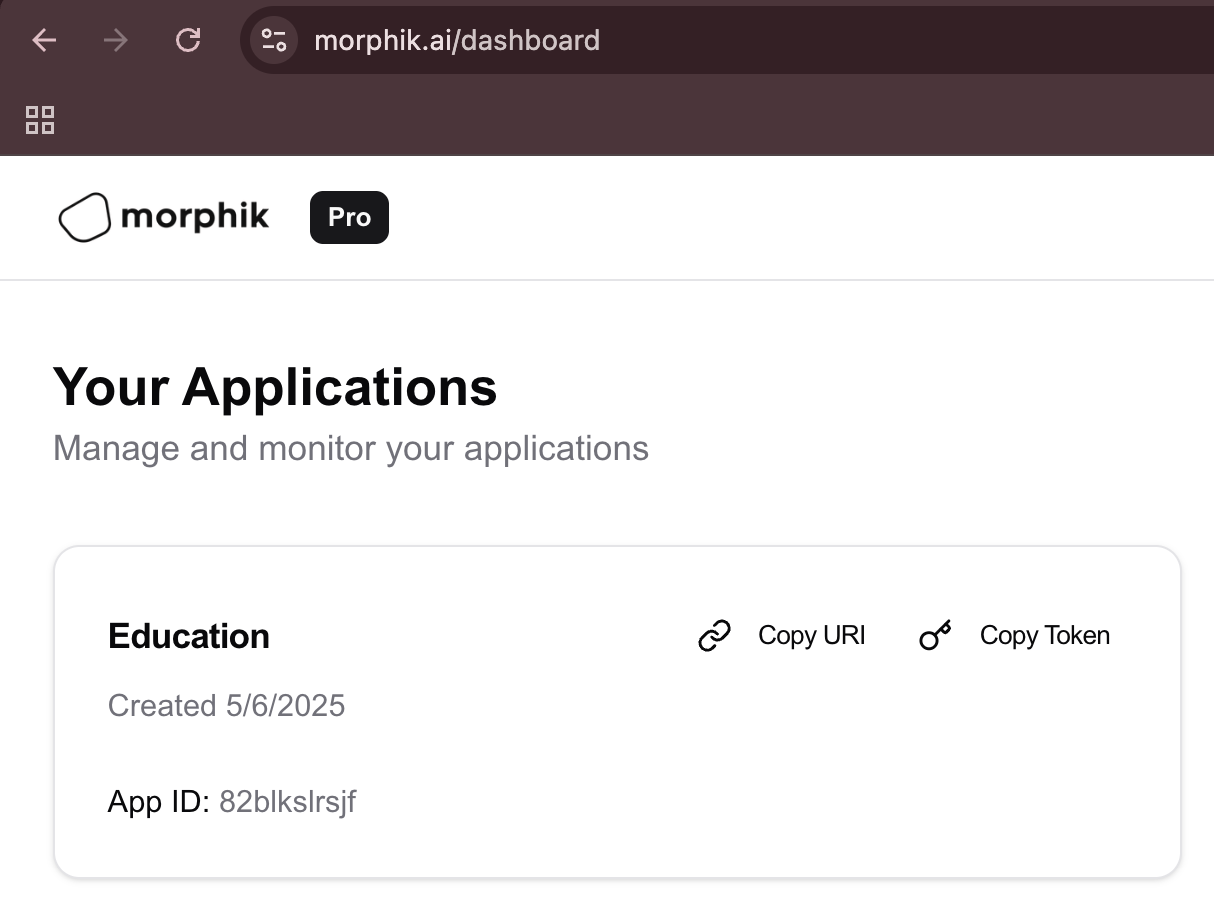 From the Morphik dashboard:
* **Python SDK**: Click "Copy URI"
* **TypeScript/API**: Click "Copy Token"
## Installation
```bash theme={null}
npm install morphik
```
```bash theme={null}
pip install morphik
```
## Ingest a Document
```python theme={null}
from morphik import Morphik
# Initialize with your URI
client = Morphik("YOUR_COPIED_URI")
# Ingest a file
with open('document.pdf', 'rb') as f:
doc = client.ingest_file(f)
print(f"Document ID: {doc.id}")
```
```typescript theme={null}
import Morphik from 'morphik';
import * as fs from 'fs';
// Initialize with your token
const client = new Morphik({
apiKey: 'YOUR_COPIED_TOKEN'
});
// Ingest a file
const file = fs.createReadStream('document.pdf');
const doc = await client.ingest.ingestFile({ file });
console.log('Document ID:', doc.external_id);
```
```bash theme={null}
curl -X POST https://api.morphik.ai/ingest/file \
-H "Authorization: Bearer YOUR_COPIED_TOKEN" \
-H "Content-Type: multipart/form-data" \
-F "file=@document.pdf"
```
## Query Your Documents
```python theme={null}
from morphik import Morphik
# Initialize with your URI
client = Morphik("YOUR_COPIED_URI")
# Query with RAG
response = client.query(
"What are the key points in this document?",
k=5,
use_colpali=True
)
print(response.answer)
```
```typescript theme={null}
import Morphik from 'morphik';
const client = new Morphik({
apiKey: 'YOUR_COPIED_TOKEN'
});
// Query with RAG
const response = await client.query.generateCompletion({
query: 'What are the key points in this document?',
k: 5,
use_colpali: true
});
console.log(response.completion);
```
```bash theme={null}
curl -X POST https://api.morphik.ai/query \
-H "Authorization: Bearer YOUR_COPIED_TOKEN" \
-H "Content-Type: application/json" \
-d '{
"query": "What are the key points in this document?",
"k": 5,
"use_colpali": true
}'
```
From the Morphik dashboard:
* **Python SDK**: Click "Copy URI"
* **TypeScript/API**: Click "Copy Token"
## Installation
```bash theme={null}
npm install morphik
```
```bash theme={null}
pip install morphik
```
## Ingest a Document
```python theme={null}
from morphik import Morphik
# Initialize with your URI
client = Morphik("YOUR_COPIED_URI")
# Ingest a file
with open('document.pdf', 'rb') as f:
doc = client.ingest_file(f)
print(f"Document ID: {doc.id}")
```
```typescript theme={null}
import Morphik from 'morphik';
import * as fs from 'fs';
// Initialize with your token
const client = new Morphik({
apiKey: 'YOUR_COPIED_TOKEN'
});
// Ingest a file
const file = fs.createReadStream('document.pdf');
const doc = await client.ingest.ingestFile({ file });
console.log('Document ID:', doc.external_id);
```
```bash theme={null}
curl -X POST https://api.morphik.ai/ingest/file \
-H "Authorization: Bearer YOUR_COPIED_TOKEN" \
-H "Content-Type: multipart/form-data" \
-F "file=@document.pdf"
```
## Query Your Documents
```python theme={null}
from morphik import Morphik
# Initialize with your URI
client = Morphik("YOUR_COPIED_URI")
# Query with RAG
response = client.query(
"What are the key points in this document?",
k=5,
use_colpali=True
)
print(response.answer)
```
```typescript theme={null}
import Morphik from 'morphik';
const client = new Morphik({
apiKey: 'YOUR_COPIED_TOKEN'
});
// Query with RAG
const response = await client.query.generateCompletion({
query: 'What are the key points in this document?',
k: 5,
use_colpali: true
});
console.log(response.completion);
```
```bash theme={null}
curl -X POST https://api.morphik.ai/query \
-H "Authorization: Bearer YOUR_COPIED_TOKEN" \
-H "Content-Type: application/json" \
-d '{
"query": "What are the key points in this document?",
"k": 5,
"use_colpali": true
}'
```